ClipWatcher - A Clipboard URL Collector Built Entirely by Local AI Agents
A tiny Windows app that watches the clipboard and saves every URL it finds - tests what a fully local coding stack can build - and presents the results for your review.
Well, now that I’m actually working on the site again and posting content, I’ve been jumping around tracking links. Some of which I want to write about, and some I just find interesting and want to share or just record so I can reference them again later. So… I built a small utility to help me gather and manage links for the Links section of this blog. And I always hate to ever do something for a single payback. In that spirit, here it is. The project is ClipWatcher — a Windows desktop app that watches your clipboard and automatically saves any URLs it finds to a text file.
It has three purposes, and I’ll take them in order.
Purpose one: keeping track of links
As I populate my Links and gather items I may want to write up, I often have trouble keeping track of everything I’m interested in posting or writing about. I looked at the obvious options and rejected them:
- Not a browser plugin — I’d have to keep it synced across multiple computers and browsers.
- Not a web interface — that means going back and forth pasting things and keeping all the browser security straight.
What I wanted instead: a simple .NET 10 app I can run on my Windows box, point at a network share, and keep everything in one place. Run it on various computers, all writing to the same file. And since it’s .NET 10, adding a Linux version later is easy if I need it.
What it does
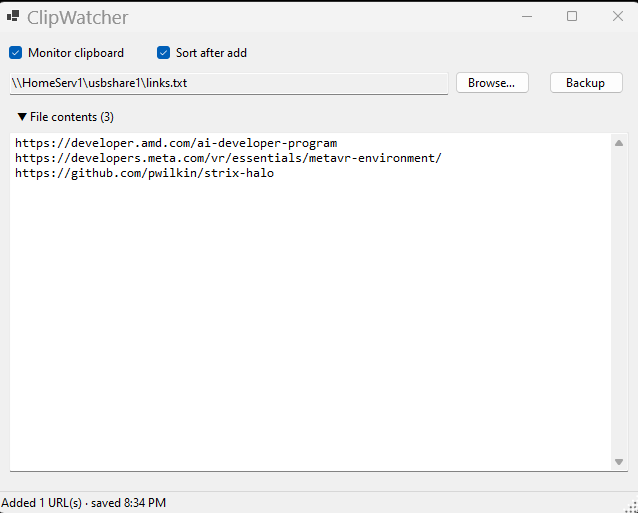
- Monitors the clipboard continuously and extracts URLs —
http/https,www., and bare domains - Skips duplicates and ignores file links (e.g.
.pdf,.zip,.png) - Optional alphabetical sorting after each add (on by default, toggleable)
- Collapsible, editable view of the URL file with debounced auto-save
- Backup & New button: copies the current file to a timestamped backup and starts a fresh one
- Remembers your settings (file path, toggles) between runs
URLs are appended to a plain-text file, one URL per line (default: %AppData%\ClipWatcher\urls.txt, but Browse… points it anywhere — that’s where the network share comes in). Edit the file freely; changes auto-save about a second after you stop typing.
A nice, simple UI I can leave just floating behind my other windows. Easy to access and check up on but not something I have to tab to or even pay attention to during my regular work. And if I do end up picking up some links - say I’m editing and it pulls out something like the repo URL when I’m editing here, it’s easy to see and just pull that out if I don’t want it in the list. And when I change tasks, I can just hit the Backup button, get the list timestamped and saved, then start over again with a clean slate. If I want to resume, just open up the old one and go again. And if I DO want to leave myself a note - I can just put a comment after the link and it travels along with it during the file lifespan.
Then when I have a batch of links I’m ready to go with, I can just paste them over into my Hermes agent with a simple prompt:
Here is a list of links - for each one, add an entry into the Links area of the philwheat site based on the structure that is already there. For each of them, also give a summary of the content at the link in addition to the comment that is associated with the link in this list. The items should be saved in draft mode so I can review them before they get published.
Let me know if you have any questions about the task before starting.
Then paste in the links. Of course at some point I’ll probably make THAT a skill, but for now that’s working well enough. Simple and easy.
Purpose two: testing the “vibe ability” of the local stack
Nothing cloud on this one. It was all built on my local stack:
- Visual Studio Code with OpenCode 1.18.35 on my desktop
- Lemonade Server 2026.41.1 on my Strix Halo LLM server, running Qwen 3.8 Flash Next, tested using a halogen back end coordinated through the Lemonade server
No code written by me — just the agents in OpenCode driving the local model back end. I don’t have a good wall-clock time since I didn’t catch every approve message immediately, but it ran for about an afternoon.
The session metrics (WinForms clipboard URL logger, 99 assistant messages):
- Input: 2,998,713 · Output: 39,051 · Reasoning: 27,451 · Cache read: 5,171,479
- Total: ~8.24M tokens (~3.07M excluding cache reads)
- Token cost: $0 — the benefits of running local. (After the costs of the Strix Halo are covered, of course.)
The test was a resounding success for me - I did a quick and simple requirements document and the tools expanded that and gave it to me for a review (see the resulting files over in the docs directory in the repo). It was good enough to accept right off the bat (the simple, well defined task helped a lot there) and I let it go off and work. The only issue I ran into was that I have it under enough limits that it did need to ask for permissions every so often which I didn’t immediately catch because I was working on other things, but that’s on me not it.
Would I say this was the equal of the largest and best frontier coding models? Well, that wouldn’t really be a fair comparison… because the task turned out to be WELL within the capabilities of my local setup. So in this case, with the exception of speed, yes it was the equal with the benefit that I wasn’t worried about quota or cost. I could just let it run. And even with speed… well I wasn’t sitting watching it and waiting, so I can’t even complain about that. I got 60-70 tokens/sec over the run which I’ll absolutely take.
Purpose three: showing the results of the local stack for you to evaluate.
There’s a ton of benchmarks and One Shot projects of ducks and web games out there. But I haven’t seen a lot of small, focused utilities being published. You know, those things that can just help you do stuff without needing to burn tokens with “plz find the links in this” or “save this to my obsidian vault.”
So here you can see what can be done without a lot of effort to do some regular automation - repeatable and free to run once you get it going.
Build & run
Requirements: Windows with the .NET 10 SDK.
dotnet run --project ClipWatcher
Tests with:
dotnet test
The project is small and deliberately structured — a WinForms shell over four service classes (clipboard listener, URL extractor, file store, settings), with xUnit tests for the services:
ClipWatcher/
  MainForm.cs            UI wiring
  Services/
    ClipboardMonitor.cs  Win32 clipboard listener
    UrlExtractor.cs      URL detection + blocklist
    UrlFileStore.cs      file model: load/save/dedupe/sort/backup
    AppSettings.cs       persisted settings
  ClipWatcher.Tests/     xUnit tests for the services
Try it
The repo is public: github.com/PhilWheat/ClipWatcher. Feel free to fork, copy, re-use, or mangle as you wish.
Let me know if you have any comments, happy to hear about your views. I’ll try to keep posting examples as I expand the scope of my tools. I’ve got a very nice information monitor program I’m working on with a more hands-on approach, but that may take just a bit more time to get it to where I’m ready to push it out publicly.